网站标题特殊符号爱情链接
HandyControl是一套WPF控件库,它几乎重写了所有原生样式,同时包含80余款自定义控件(正逐步增加),下面我们开始使用。
1、准备
1.1 创建项目
C# WPF应用(.NET Framework)创建项目
1.2 添加包

1.3 在App.xaml中引用HandyControl的皮肤和主题:
<Application.Resources><ResourceDictionary><ResourceDictionary.MergedDictionaries><ResourceDictionary Source="pack://application:,,,/HandyControl;component/Themes/SkinDefault.xaml"/><ResourceDictionary Source="pack://application:,,,/HandyControl;component/Themes/Theme.xaml"/></ResourceDictionary.MergedDictionaries></ResourceDictionary>
</Application.Resources>

1.4 窗体文件xaml添加引用
xmlns:hc="https://handyorg.github.io/handycontrol"
2、窗体
2.1 改Window为hc:Window
<hc:Window x:Class="HandyControlTest.MainWindow"xmlns="http://schemas.microsoft.com/winfx/2006/xaml/presentation"xmlns:x="http://schemas.microsoft.com/winfx/2006/xaml"xmlns:d="http://schemas.microsoft.com/expression/blend/2008"xmlns:mc="http://schemas.openxmlformats.org/markup-compatibility/2006"xmlns:hc="https://handyorg.github.io/handycontrol"xmlns:local="clr-namespace:HandyControlTest"mc:Ignorable="d"Title="MainWindow" Height="450" Width="800"><Grid></Grid>
</hc:Window>
2.2 修改窗体的xaml.cs文件
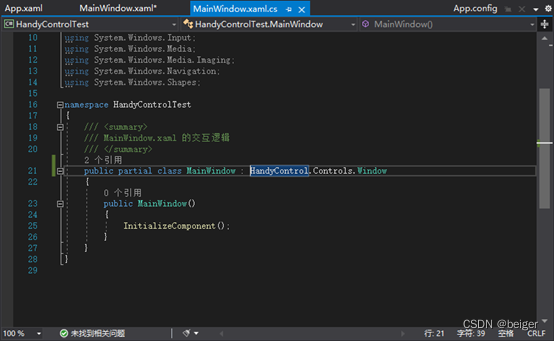
修改窗体类名,否则报错:“分部声明一定不能指定不同的基类”
public partial class MainWindow : Window
↓
public partial class MainWindow : HandyControl.Controls.Window
2.3 扩展属性

2.4 代码修改
CloseButtonBackground="Blue" CloseButtonForeground="White"
CloseButtonHoverBackground="Red" CloseButtonHoverForeground="Black"
OtherButtonBackground="Green" OtherButtonForeground="White"
OtherButtonHoverBackground="Yellow" OtherButtonHoverForeground="Black"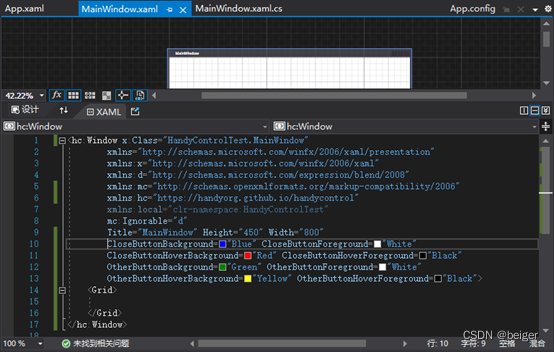
2.5 运行结果

2.6 其它参数
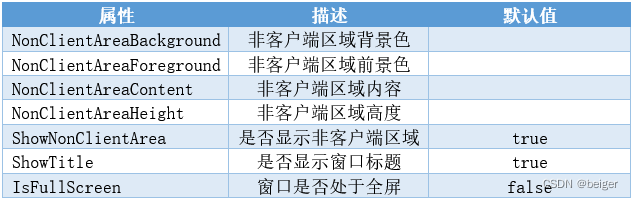
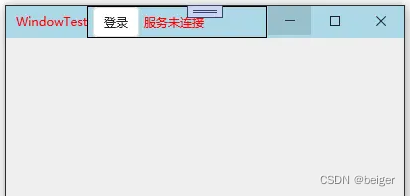
NonClientAreaBackground用来设置了标题栏的背景色。NonClientAreaForeground用来设置标题栏的前景色,不仅仅可以用来设置标题的前景色,也可以设置NonClientAreaContent中控件的默认前景色。NonClientAreaHeight用来设置标题栏的高度。下面看一段代码:
<hc:Window x:Class="TestDemo.View.WindowTest"xmlns="http://schemas.microsoft.com/winfx/2006/xaml/presentation"xmlns:x="http://schemas.microsoft.com/winfx/2006/xaml"xmlns:hc="https://handyorg.github.io/handycontrol"Title="WindowTest" Height="200" Width="400"NonClientAreaBackground ="LightBlue" NonClientAreaForeground="Red"NonClientAreaHeight="100"><hc:Window.NonClientAreaContent ><Border BorderThickness="1" BorderBrush="Black"><StackPanel HorizontalAlignment="Left" Orientation="Horizontal"><Button Margin="5,0,0,0" Content="登录"/><TextBlock Text="服务未连接" VerticalAlignment="Center" Margin="5,0,0,0" /></StackPanel></Border></hc:Window.NonClientAreaContent>
</hc:Window>
运行效果:
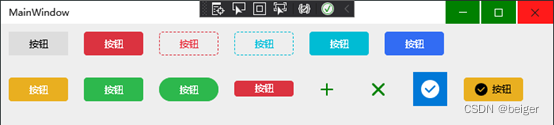
3、 按钮
3.1 代码
<Grid><StackPanel Orientation="Vertical"><StackPanel Orientation="Horizontal"><Button Content="按钮" Margin="10,10" Width="75"Style="{StaticResource ButtonBaseBaseStyle}" Foreground="Black" /><Button Content="按钮" Margin="10,10" Width="75"Style="{StaticResource ButtonDanger}" /><Button Content="按钮" Margin="10,10" Width="75"Style="{StaticResource ButtonDashedDanger}" /><Button Content="按钮" Margin="10,10" Width="75"Style="{StaticResource ButtonDashedInfo}" /><Button Content="按钮" Margin="10,10" Width="75"Style="{StaticResource ButtonInfo}" /><Button Content="按钮" Margin="10,10" Width="75"Style="{StaticResource ButtonPrimary}" /></StackPanel><StackPanel Orientation="Horizontal"><Button Content="按钮" Margin="10,10" Width="75"Style="{StaticResource ButtonWarning}" /><Button Content="按钮" Margin="10,10" Width="75"Style="{StaticResource ButtonSuccess}" /><Button Content="按钮" Margin="10,10" Width="75"Style="{StaticResource ButtonSuccess}" hc:BorderElement.CornerRadius="15"/><Button Content="按钮" Margin="10,10" Width="75"Style="{StaticResource ButtonDanger.Small}" /><Button Margin="10,10" Width="45"Style="{StaticResource ButtonIcon}" hc:IconElement.Geometry="{StaticResource AddGeometry}"Foreground="Green"/><Button Margin="10,10" Width="45"Style="{StaticResource ButtonIcon}" hc:IconElement.Geometry="{StaticResource RemoveGeometry}"Foreground="Green"/><Button Margin="10,10" Width="45" Height="45"Style="{StaticResource ButtonIcon}" hc:IconElement.Geometry="{StaticResource SuccessGeometry}"Foreground="White"Background="{DynamicResource {x:Static SystemColors.HighlightBrushKey}}"/><Button Content="按钮" Margin="10,10" Width="75"Style="{StaticResource ButtonWarning}" hc:IconElement.Geometry="{StaticResource SuccessGeometry}"Foreground="Black"/></StackPanel></StackPanel>
</Grid>
3.2 运行效果