
网站建设 音频插件竞价托管代运营
本篇将会介绍beutifulsoup4模块,可以用于网络爬虫、解析HTML和XML,对于没有接触过前端,不了解HTML是如何工作的,需要先解释一下什么事HTML。
1. HTML
网页中的各种布局等的背后都是非常简单的纯文本格式,那种格式称为HTML。
关于HTML不用刻意的去学习,所谓的HTML就是一堆<>括起来的符合或单词,不同的单词就是标签,其对应了不同的作用。
如果在网络上进行通信,获取网页,实际上不会得到我们打开的网页的界面,得到的就是html的代码,而我们关心的可能就是HTML中的一部内容,就需要对HTTML也就是字符串进行解析,找出我们需要的部分。通过python的字符串来进行处理也是可行的,但是考虑到处理的效率,也有相应的开发的模块。
2. 安装bs4
pip install beutifulsoup4
官网文档(中文版):
https://www.crummy.com/software/BeautifulSoup/bs4/doc.zh/
3. 使用BeautifulSoup解析HTML实例
使用的HTML代码如下:来自于官方文档中的范例:a、p均为标签
html_doc = """
<html><head><title>The Dormouse's story</title></head>
<body>
<p class="title"><b>The Dormouse's story</b></p><p class="story">Once upon a time there were three little sisters; and their names were
<a href="http://example.com/elsie" class="sister" id="link1">Elsie</a>,
<a href="http://example.com/lacie" class="sister" id="link2">Lacie</a> and
<a href="http://example.com/tillie" class="sister" id="link3">Tillie</a>;
and they lived at the bottom of a well.</p><p class="story">...</p>
"""
将其拷贝到一个txt文件,改后缀为html,利用浏览器打开就是一个网页如下:
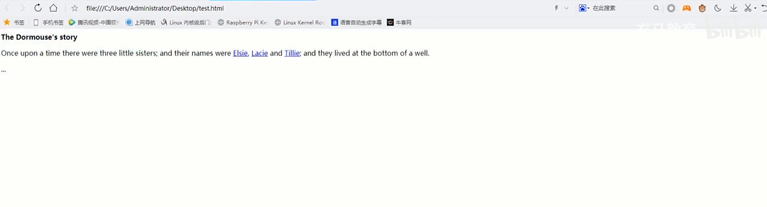
- bs4中提供了BeautifulSoup的方法,它可以将html字符串,转化为一个soup对象。
- soup对象中提供了各种属性方法,对应了htm文档,使得我们可以很方便地提取相关信息
以下演示如何进行安装、导入模块、进行HTML的缩进美化
C:\Users\>pip install beautifulsoup4
C:\Users\>ipython
In [1]: from bs4 import BeautifulSoup
In [2]: html_doc = """...: <html><head><title>The Dormouse's story</title></head>...: <body>...: <p class="title"><b>The Dormouse's story</b></p>...:...: <p class="story">Once upon a time there were three little sisters; and their names were...: <a href="http://example.com/elsie" class="sister" id="link1">Elsie</a>,...: <a href="http://example.com/lacie" class="sister" id="link2">Lacie</a> and...: <a href="http://example.com/tillie" class="sister" id="link3">Tillie</a>;...: and they lived at the bottom of a well.</p>...:...: <p class="story">...</p>...: """In [3]: soup = BeautifulSoup(html_doc, 'html.parser') #转变为soup对象In [4]: print(soup.prettify()) #把原有HTML源码进行缩进美化
<html><head><title>The Dormouse's story</title></head><body><p class="title"><b>The Dormouse's story</b></p><p class="story">Once upon a time there were three little sisters; and their names were<a class="sister" href="http://example.com/elsie" id="link1">Elsie</a>,<a class="sister" href="http://example.com/lacie" id="link2">Lacie</a>and<a class="sister" href="http://example.com/tillie" id="link3">Tillie</a>;
and they lived at the bottom of a well.</p><p class="story">...</p></body>
</html>
构造得到的soup对象中提供了各种操作的方法。
find_all:找到所有的标签,返回一个list,list中的每个元素,是标签对象。
In [5]: soup.find_all("a")
Out[5]:
[<a class="sister" href="http://example.com/elsie" id="link1">Elsie</a>,<a class="sister" href="http://example.com/lacie" id="link2">Lacie</a>,<a class="sister" href="http://example.com/tillie" id="link3">Tillie</a>]In [6]: for i in soup.find_all("a"):...:     print(i)...:
<a class="sister" href="http://example.com/elsie" id="link1">Elsie</a>
<a class="sister" href="http://example.com/lacie" id="link2">Lacie</a>
<a class="sister" href="http://example.com/tillie" id="link3">Tillie</a>In [7]: mylist = soup.find_all("a")In [8]: tag0 = mylist[0]In [9]: tag0
Out[9]: <a class="sister" href="http://example.com/elsie" id="link1">Elsie</a>In [10]: tag0['href'] #标签类似dict的封装,得到href的value
Out[10]: 'http://example.com/elsie'
In [11]: for item in mylist:...:     print(item["href"])...:
http://example.com/elsie
http://example.com/lacie
http://example.com/tillie4.学习视频地址:使用python解析网页HTML