这里给大家分享我在网上总结出来的一些知识,希望对大家有所帮助

一,问题起因
最新在开发小程序的时候,调用微信小程序来获取用户信息的时候经常报错一个问题
fail api scope is not declared in the privacy agreement,api
更具公告,是微信更新对应的隐私协议
https://mp.weixin.qq.com/cgi-bin/announce?action=getannouncement&announce_id=11691660367cfUvX&version=&lang=zh_CN&token=

二,解决方案
下面是我总结的解决步骤
1.前往微信小程序公众平台配置设置,完善并提交信息(注意:更新好隐私协议,要通过审核的,接口才能正常访问)
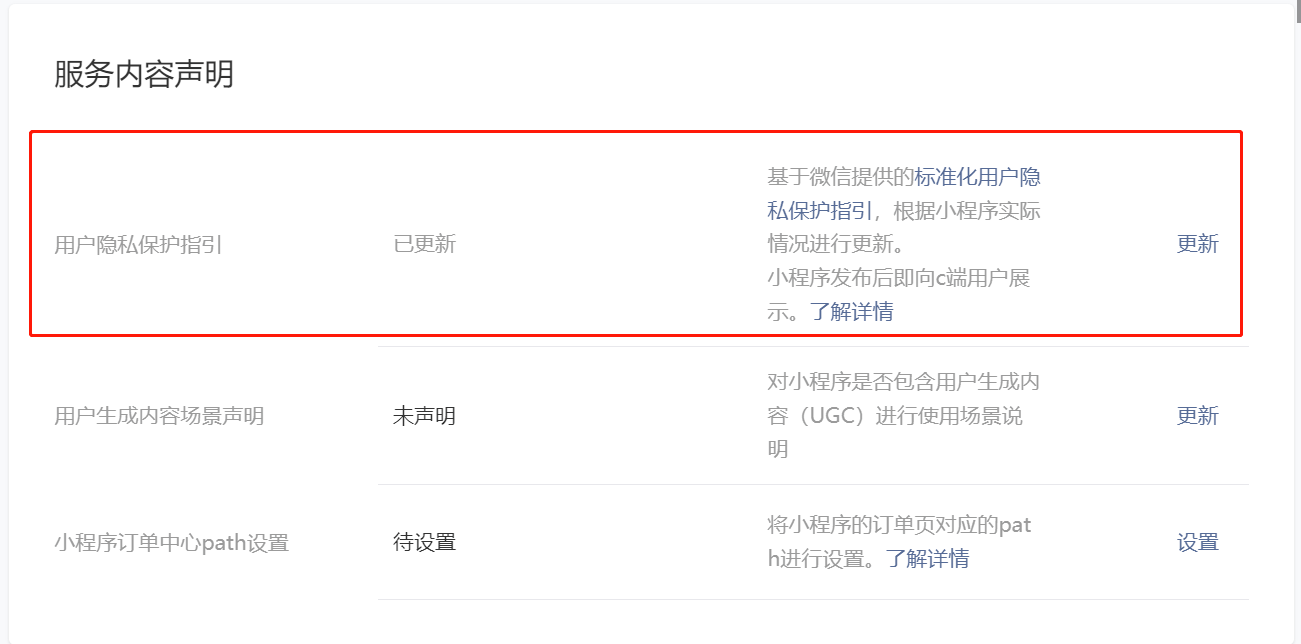
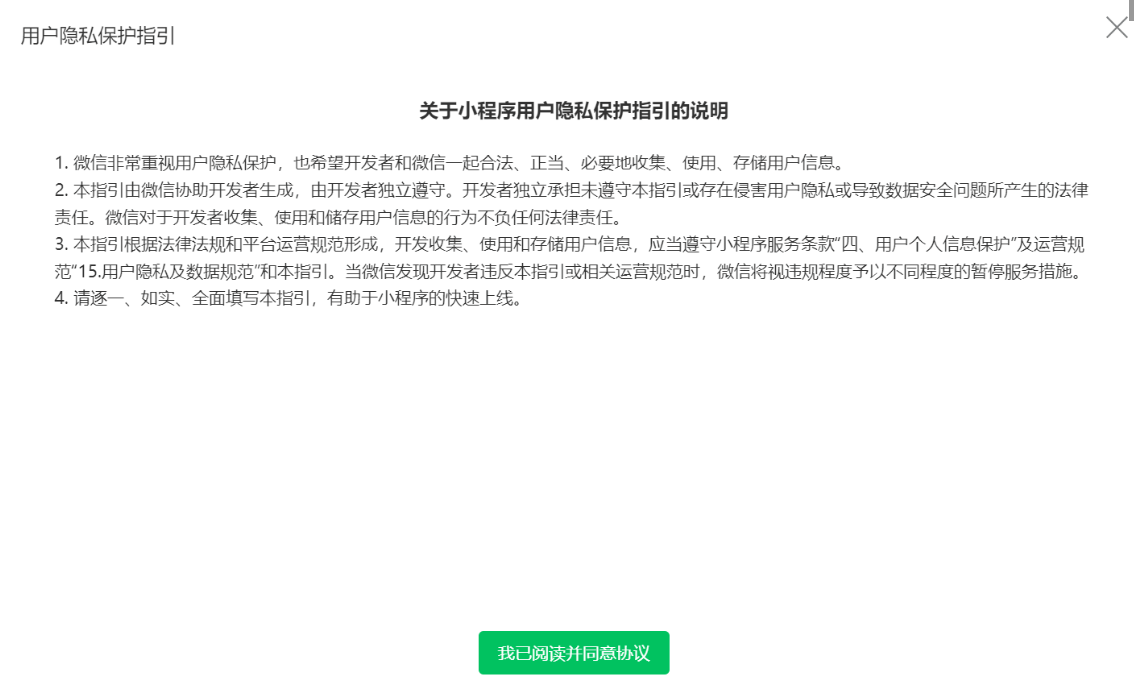
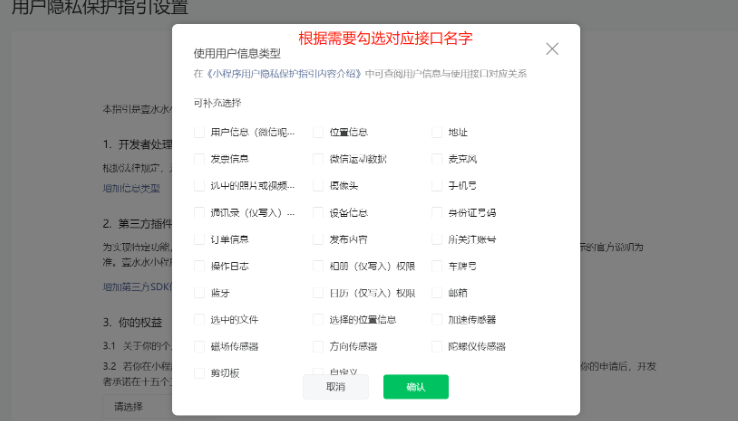
2.在components新增组件PrivacyPop
vue2版本
<template><view class="privacy" v-if="showPrivacy"><view class="content"><view class="title">隐私保护指引</view><view class="des">在使用当前小程序服务之前,请仔细阅读<text class="link" @tap="openPrivacyContract">{{ privacyContractName }}</text>。如你同意{{privacyContractName }},请点击“同意”开始使用。</view><view class="btns"><button class="item reject" @tap="exitMiniProgram">拒绝</button><button id="agree-btn" class="item agree" open-type="agreePrivacyAuthorization"@agreeprivacyauthorization="handleAgreePrivacyAuthorization">同意</button></view></view></view>
</template><script>
export default {data() {return {privacyContractName: '《XXX隐私保护引导》',showPrivacy: false}},methods: {checkPrivacySetting(){uni.getPrivacySetting({success: res => {console.log("getPrivacySetting",res)this.showPrivacy = true// 返回结果为: res = { needAuthorization: true/false, privacyContractName: '《xxx隐私保护指引》' }// if (res.needAuthorization) {// 需要弹出隐私协议// this.showPrivacy = false// } else {// this.showPrivacy = true// 用户已经同意过隐私协议,所以不需要再弹出隐私协议,也能调用已声明过的隐私接口// wx.getUserProfile()// wx.chooseMedia()// wx.getClipboardData()// wx.startRecord()// }},fail: () => {},complete: () => {}})},// 打开隐私协议openPrivacyContract() {uni.openPrivacyContract({fail: () => {uni.showToast({title: '遇到错误',icon: 'error'})}})},// 拒绝隐私协议exitMiniProgram() {console.log("拒绝隐私协议")const that = this;// 直接退出小程序// wx.exitMiniProgram()uni.showModal({// 如果拒绝,我们将无法获取您的信息, 包括手机号、位置信息、相册等该小程序十分重要的功能,您确定要拒绝吗?content: '您确定要拒绝吗?',success: res => {if (res.confirm) {that.showPrivacy = false;uni.exitMiniProgram({success: () => {console.log('退出小程序成功');}});}}});},// 同意隐私协议handleAgreePrivacyAuthorization() {wx.requirePrivacyAuthorize({success: () => {// 用户同意授权// 继续小程序逻辑this.showPrivacy = false},fail: () => {}, // 用户拒绝授权complete: () => {}})}}
}
</script> <style scoped> .privacy {position: fixed;top: 0;right: 0;bottom: 0;left: 0;background: rgba(0, 0, 0, .5);z-index: 9999999;display: flex;align-items: center;justify-content: center;}.content {width: 632rpx;padding: 48rpx;box-sizing: border-box;background: #fff;border-radius: 16rpx;}.content .title {text-align: center;color: #333;font-weight: bold;font-size: 32rpx;}.content .des {font-size: 26rpx;color: #666;margin-top: 40rpx;text-align: justify;line-height: 1.6;}.content .des .link {color: #07c160;text-decoration: underline;}.btns {margin-top: 48rpx;display: flex;}.btns .item {justify-content: space-between;width: 244rpx;height: 80rpx;display: flex;align-items: center;justify-content: center;border-radius: 16rpx;box-sizing: border-box;border: none;}.btns .reject {background: #f4f4f5;color: #909399;}.btns .agree {background: #07c160;color: #fff;}
</style>
vue3版本
<template><view class="privacy" v-if="showPrivacy"><view class="content"><view class="title">隐私保护指引</view><view class="des">在使用当前小程序服务之前,请仔细阅读<text class="link" @tap="openPrivacyContract">{{ privacyContractName }}</text>。如你同意{{privacyContractName }},请点击“同意”开始使用。</view><view class="btns"><button class="item reject" @tap="exitMiniProgram">拒绝</button><button id="agree-btn" class="item agree" open-type="agreePrivacyAuthorization"@agreeprivacyauthorization="handleAgreePrivacyAuthorization">同意</button></view></view></view>
</template><script lang="ts" setup>import { ref } from "vue";const privacyContractName = ref('《用户隐私保护引导》');const showPrivacy = ref(false);const checkPrivacySetting = () => {uni.getPrivacySetting({success: (res) => {showPrivacy.value = true}})}// 打开隐私协议const openPrivacyContract = () => {uni.openPrivacyContract({fail: () => {uni.showToast({title: '遇到错误',icon: 'error'})}})}// 拒绝隐私协议const exitMiniProgram = () => {console.log("拒绝隐私协议")uni.showModal({// 如果拒绝,我们将无法获取您的信息, 包括手机号、位置信息、相册等该小程序十分重要的功能,您确定要拒绝吗?content: '您确定要拒绝吗?',success: res => {if (res.confirm) {showPrivacy.value = false;uni.exitMiniProgram({success: () => {console.log('退出小程序成功');}});}}});}// 同意隐私协议const handleAgreePrivacyAuthorization = () => {wx.requirePrivacyAuthorize({success: () => {// 用户同意授权// 继续小程序逻辑showPrivacy.value = false},fail: () => { }, // 用户拒绝授权complete: () => { }})}
</script><style scoped>.privacy {position: fixed;top: 0;right: 0;bottom: 0;left: 0;background: rgba(0, 0, 0, .5);z-index: 9999999;display: flex;align-items: center;justify-content: center;}.content {width: 632rpx;padding: 48rpx;box-sizing: border-box;background: #fff;border-radius: 16rpx;}.content .title {text-align: center;color: #333;font-weight: bold;font-size: 32rpx;}.content .des {font-size: 26rpx;color: #666;margin-top: 40rpx;text-align: justify;line-height: 1.6;}.content .des .link {color: #07c160;text-decoration: underline;}.btns {margin-top: 48rpx;display: flex;}.btns .item {justify-content: space-between;width: 244rpx;height: 80rpx;display: flex;align-items: center;justify-content: center;border-radius: 16rpx;box-sizing: border-box;border: none;}.btns .reject {background: #f4f4f5;color: #909399;}.btns .agree {background: #07c160;color: #fff;}
</style>
3.在要使用的页面中引入
vue2版本
import PrivacyPop from '../../components/PrivacyPop/PrivacyPop.vue';components:{PrivacyPop
},
async onLoad() {this.$refs.PrivacyPopck.checkPrivacySetting();
},
vue3版本(建议点击事件触发)
import PrivacyPop from '@/components/PrivacyPop.vue';
import { ref } from "vue";
const PrivacyObj = ref({})
const ClickFun = ()=>{if(PrivacyObj.value){PrivacyObj.value.checkPrivacySetting();}}
如果对您有所帮助,欢迎您点个关注,我会定时更新技术文档,大家一起讨论学习,一起进步。