
伍菲网站建设站长网站推广
代码地址:https://gitee.com/zzhua195/easyblog-web-vuee
Framework.vue
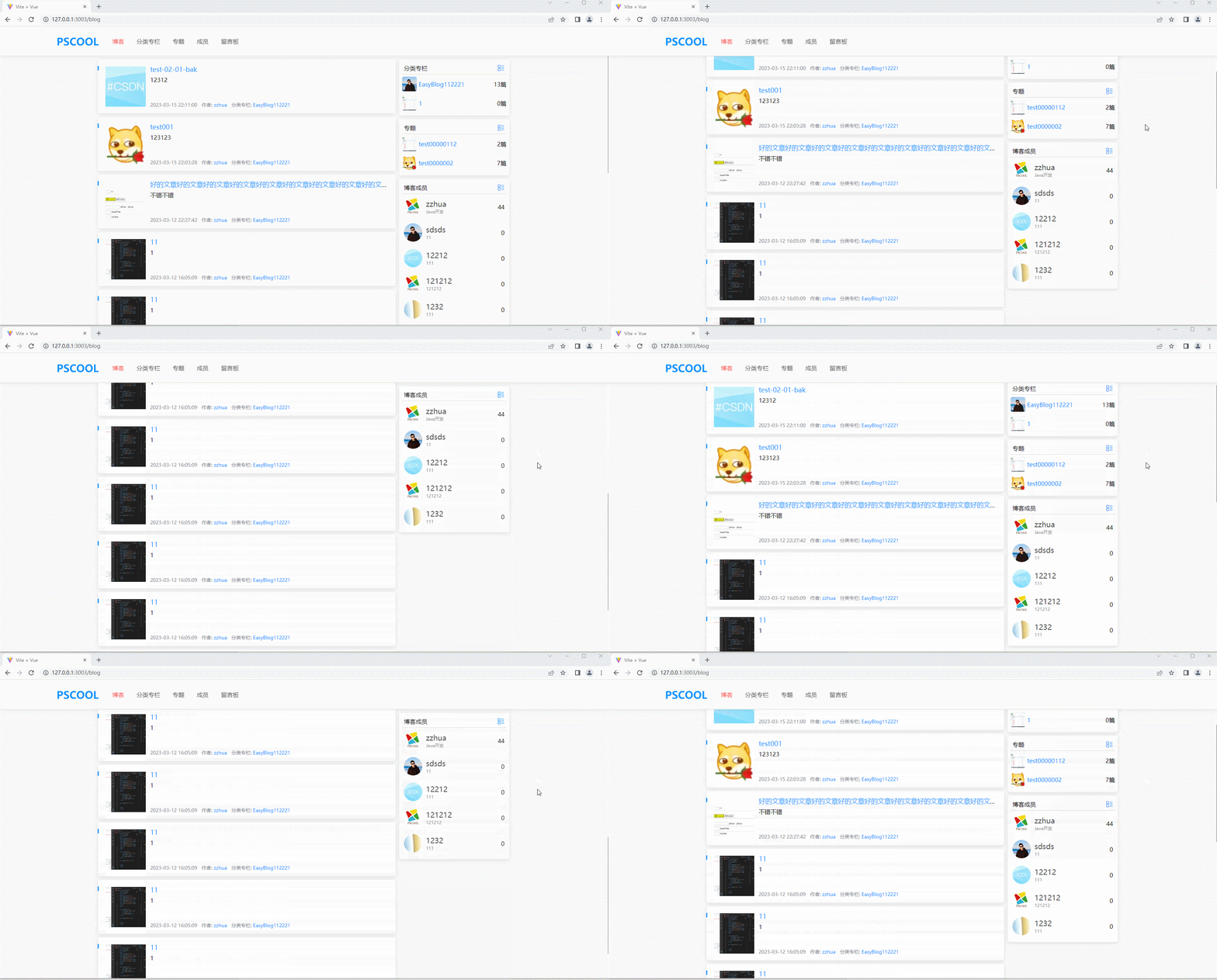
在这个布局组件中,监听main的滚动事件,获取滚动的距离,将它存入store,以便其它组件能够共享,监听到
<template><div class="header"><div class="header-wrapper"><Header></Header></div></div><div class="main" ref="mainRef"><router-view/><div class="main-footer" v-if="route.fullPath === '/blog' || route.fullPath === '/member'"><div class="content-wrapper"><Footer></Footer></div></div></div>
</template><script setup>import Header from './Header.vue';import Footer from './Footer.vue';import { onMounted,ref } from 'vue';import { useStore } from 'vuex'import store from '@/store';import { useRoute } from 'vue-router'const route = useRoute()const mainRef = ref(null)onMounted(()=>{// console.log(mainRef.value);mainRef.value.addEventListener('scroll',function(){store.commit('updateMainScrollTop',mainRef.value.scrollTop)})})</script><style lang="scss"></style>
Blog.vue
- 先给main-body-right动态绑定sitcky的类名,在这个类名下,先设置好固定定位的样式
- 监听store里的滚动距离,如果大于这个距离,就给main-body-right添加sticky这个类名,如果小于就删除这个类名
- 第三步也是最麻烦的,我们需要动态的获取到teamUserRef这个dom距离它的定位父元素的高度,不想写死这个高度。有几个坑踩过了:
- 不能直接在onMounted中获取mainRef距离它最近的定位父元素的高度,因为onMounted是在组件挂载完后执行,注意到,在setup里面,是通过promise发的异步请求,数据还没返回来,这个时候setup已经执行完了,用的是定义的最初的数据就进行了渲染
- 不能直接在then的回调中直接去拿mainRef距离它最近的定位父元素的高度,因为(js单线程),等到数据回来了(事件循环任务队列),执行完then回调后(整个then执行完),再执行的渲染,应该是要等到到渲染完毕,才能获取到这个距离,要放到nextTick里面才行。
- 因为在setup里面有获取专栏和专题这2个数据,也不知道谁先谁后,所以两个地方都写吧
- mainRef刚开始是直接写在BlogItem组件上的,发现拿到的是undefined,是因为vue3需要使用defineExpose把组件需要的东西暴露出来,才能拿到,拿到的也不是dom。我以为拿到的是dom,这是错的!
- 也可以监听BlogItem的finished事件,来获取这个高度,但是触发事件时也必须写在onUpdated里面,
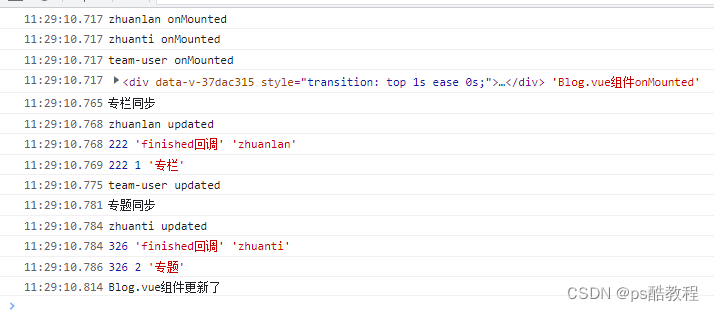
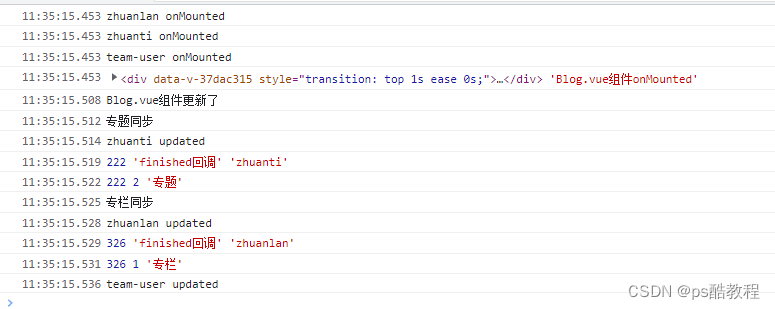
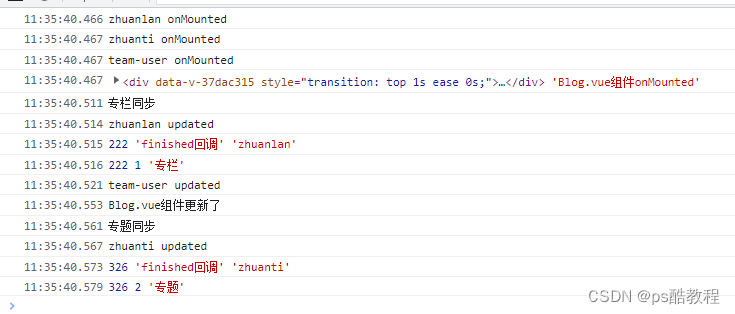
- 下面是执行的打印情况,也可以从中看出vue它的执行过程,可以看到三个子组件先onMounted了,然后父组件就onMounted了,然后专栏的数据响应回来了,先把回调全部执行完(专栏同步),然后触发子组件更新,updated回调,然后nextTick就执行了,专题也是一样。
<template><div class="main-body content-wrapper" :style="{ 'min-height': 'calc(100% - 10px)' }"><div class="main-body-left"><BlogItem :blogInfo="blogInfo" v-for="blogInfo, index in blogDataInfo.list" :key="index" class="blog-info" /><el-pagination background layout="prev, pager, next" style="margin-bottom: 12px;":total="blogDataInfo.totalCount" @current-change="handleCurrentChange" :pageSize="blogDataInfo.pageSize" /></div><div :class="['main-body-right', { 'sticky': isSticky }]"><div><blog-side-item who="zhuanlan" @finished="finishd" title="分类专栏"><ul><li class="li-side-category" v-for="category, index in categoryListInfo" :key="index"><div class="side-category"><img class="avatar" :src="proxy.globalInfo.imageUrl + category.cover" alt=""><router-link :to="'/category/' + category.categoryId"><h2>{{ category.categoryName }}</h2></router-link></div><div class="count"><span>{{ category.blogCount }}篇</span></div></li></ul></blog-side-item></div><div><blog-side-item who="zhuanti"  @finished="finishd"  title="专题"><ul><li class="li-side-category" v-for="special, index in specialInfo.list" :key="index"><div class="side-category"><img class="avatar" :src="proxy.globalInfo.imageUrl + special.cover"><router-link :to="'/special/' + special.categoryId"><h2>{{ special.categoryName }}</h2></router-link></div><div class="count"><span>{{ special.blogCount }}篇</span></div></li></ul></blog-side-item></div><div  style="transition:top 1s;" ref="teamUserRef"><blog-side-item who="team-user" title="博客成员" class="team-user" id="teamUser" ><ul><li v-for="userInfo, index in userListInfo" :key="index" class="user-li"><router-link :to="'/member#user-info-' + userInfo.userId" href="#" class="user-part"><img :src="proxy.globalInfo.imageUrl + userInfo.avatar" alt=""><div class="user-info"><div class="nick-name">{{ userInfo.nickName }}</div><div class="profession">{{ userInfo.profession }}</div></div></router-link><div class="count"><span>{{ userInfo.blogCount }}</span></div></li></ul></blog-side-item></div></div></div>
</template><script setup>
import { ref, reactive, getCurrentInstance, onMounted, onBeforeUnmount, watch, nextTick, onUpdated } from 'vue'
import BlogItem from './BlogItem.vue'
import BlogSideItem from './BlogSideItem.vue';
import Footer from '@/views/Footer.vue';
import { useStore } from 'vuex'
const store = useStore()
const { proxy } = getCurrentInstance()const topLength = ref(500)const api = {loadBlogList: "/view/loadBlogList",loadCategory: "/view/loadCategory",loadUser: "/view/loadTeamUser",loacSpecial: "/view/loadSpecial",
};const blogDataInfo = ref({pageSize: 10,pageNo: 1
})async function loadBlogList() {let result = await proxy.Request({url: api.loadBlogList,params: {pageSize: blogDataInfo.value.pageSize,pageNo: blogDataInfo.value.pageNo}})blogDataInfo.value = result
}
loadBlogList()
function handleCurrentChange(pageNo) {blogDataInfo.value.pageNo = pageNoloadBlogList()
}const categoryListInfo = ref({})
async function loadCategoryList() {let result = await proxy.Request({url: api.loadCategory,params: {pageSize: 5}})categoryListInfo.value = result/* topLength.value = teamUserRef.value.offsetTopconsole.log(teamUserRef.value.offsetTop, 1, '专栏'); */console.log('专栏同步');nextTick(()=>{topLength.value = teamUserRef.value.offsetTopconsole.log(teamUserRef.value.offsetTop, 1, '专栏');})
}
loadCategoryList()const userListInfo = ref([])async function loadUserInfoList() {let result = await proxy.Request({url: api.loadUser,params: {pageSize: 5}})userListInfo.value = result
}
loadUserInfoList()const specialInfo = ref([])async function loadSpecialList() {let result = await proxy.Request({url: api.loacSpecial,params: {pageSize: 3}})specialInfo.value = result/* topLength.value = teamUserRef.value.offsetTopconsole.log(teamUserRef.value.offsetTop, 2, '专题'); */console.log('专题同步');nextTick(()=>{topLength.value = teamUserRef.value.offsetTopconsole.log(teamUserRef.value.offsetTop, 2, '专题'); })
}
loadSpecialList()const isSticky = ref(false)
let val = null
const teamUserRef = ref(null)watch(() => store.state.mainScrollTop, (newVal, oldVal) => {// console.log('监听到: ' + newVal);if (newVal >= topLength.value) {isSticky.value = true} else {isSticky.value = false}
}, { immediate: true })onMounted(()=>{console.log(teamUserRef.value,'Blog.vue组件onMounted');
})function finishd(who) {topLength.value = teamUserRef.value.offsetTopconsole.log(teamUserRef.value.offsetTop, 'finished回调', who);
}onUpdated(()=>{console.log('Blog.vue组件更新了');
})
</script><style lang="scss" scoped>
.li-side-category {height: 52px;display: flex;justify-content: space-between;align-items: center;.count {margin-left: 5px;flex-shrink: 0;}.side-category {flex: 1;/* 开启省略的关键或者使用width:0 */overflow: hidden;display: inline-flex;align-items: center;.avatar {width: 40px;height: 40px;border-radius: 5px;margin-right: 5px;}a {text-overflow: ellipsis;white-space: nowrap;/* white-space属性为nowrap时,不会因为超出容器宽度而发生换行 */overflow: hidden;h2 {font-weight: normal;margin: 0;font-size: 16px;color: #1890ff;display: inline;}}}
}.user-li {padding: 10px 5px;display: flex;justify-content: space-between;align-items: center;.count {flex-shrink: 0;margin-left: 10px;}.user-part {display: inline-flex;align-items: center;flex-grow: 1;overflow: hidden;img {width: 50px;height: 50px;border-radius: 50%;margin-right: 10px;}.user-info {overflow: hidden;.nick-name {font-size: 20px;text-overflow: ellipsis;white-space: nowrap;overflow: hidden;}.profession {text-overflow: ellipsis;white-space: nowrap;overflow: hidden;color: #8d8d8d;font-size: 12px;}}}}.sticky .team-user {position: fixed;top: 90px;
}</style>
BlogItem.vue
<template><div class="side-item"><div class="side-item-top"><div class="title">{{ title }}</div><div class="more"><a href="#" title="更多" class="iconfont icon-gengduo1"></a></div></div><div class="side-item-body"><slot><div class="no-data">暂无数据</div></slot></div></div>
</template><script setup>
import { ref,reactive,onMounted,onUpdated } from 'vue'
const props = defineProps(['title','who'])
const emit  = defineEmits(['finished'])
onMounted(()=>{console.log(props.who, 'onMounted');
})
onUpdated(()=>{console.log(props.who, 'updated');emit('finished',props.who)
})
defineExpose({'halo':'你好吗'
})
</script><style lang="scss">
.side-item {width: 300px;box-sizing: border-box;background-color: #fff;border-radius: 5px;padding: 8px;box-shadow: 0 3px 10px 0px rgb(0 0 0 / 10%);margin-bottom: 10px;.more a {color: #1890ff;font-size: 20px;}.side-item-top {height: 32px;line-height: 32px;display: flex;padding: 0 5px;justify-content: space-between;border-bottom: 1px solid #ddd;}.side-item-body {.no-data {color: #9a9a9a;height: 120px;display: flex;justify-content: center;align-items: center;}}
}
</style>