父子组件之间的相互通信
- 开发过程中,我们通常会将一个页面拆分成多个组件,然后将这些组件通过组合或者嵌套的方式构建页面。组件的嵌套由父组件和子组件组成,它们之间的通信如下图所示
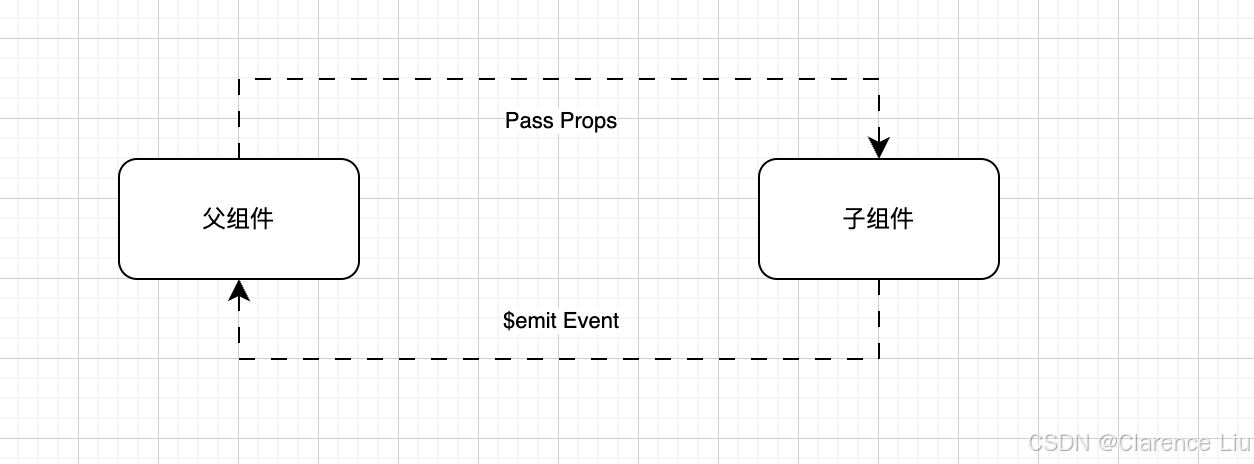
- 父组件传递数据给子组件是通过
props属性实现的;而子组件传递数据给父组件,是通过触发事件$emit实现的
父组件传递数据给子组件
Prop为字符串类型的数组
Props是在组件上注册自定义属性的一种方式。当父组件为自定义属性赋值后,子组件可以通过属性名获取对应的值。Props一般可用来传递字符串类型的数组或者对象类型
<script>
export default {props: ['title', 'content']
}
</script><template><div class="show-message"><h4>{{title}}</h4><div>{{content}}</div></div>
</template><style scoped></style>
<template><div class="app">
<ShowMessage title="我是标题" content="我是内容"></ShowMessage>
<ShowMessage :title="title" :content="content"></ShowMessage>
<ShowMessage :title="message.title" :content="message.content"></ShowMessage>
<show-message v-bind="message"></show-message></div>
</template>
<script>
import ShowMessage from "./ShowMessage.vue";
export default {components: {ShowMessage,},data() {return {title: "我是标题title",content: '我是内容content',message: {title: '我是标题message.title',content: '我是内容message.content'}}}
}
</script>
- 上面实现了从父组件
app传递数据到子组件ShowMessage
Prop为对象类型
<script>
export default {props: {title: String, content: {type: String, required: true, default: '我是内容的默认值' }}
}
</script><template><div class="show-message"><h4>{{title}}</h4><div>{{content}}</div></div>
</template><style scoped></style>
Props支持camelCase(驼峰)和kebab-case(连字符分隔)这两种方式,在HTML中,属性名不分大小写,浏览器会将所有大写字符解释为小写字符。因此,在模板中使用camelCase命名法的Props时,也可以使用其等效的kebab-case语法。- 例如我们为
ShowMessage.vue子组件添加一个messageInfo属性。该属性支持camelCase和kebab-case两种方式,如下,这两种方式是等价的
<ShowMessage message-info="我是message-info字符串" content="">
</ShowMessage>
<show-message messageInfo="我是messageInfo字符串" content="">
</show-message>
- 我们只需要在
ShowMessage.vue文件中把props改成下面这样即可
<script>
export default {props: {title: String, content: {type: String, required: true, default: '我是内容的默认值' },messageInfo: {type: String,}}
}
</script>
- 这样就能在组件
ShowMessage中接收到父组件传进来的messageInfo属性了 - 除了
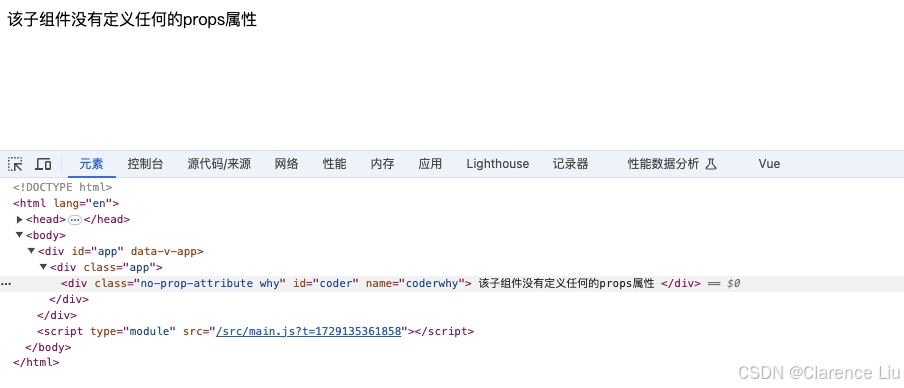
Props属性,我们还经常会为组件传递id,class等属性,这些属性被称为非Props的属性。当我们为一个组件传递某个属性,但是该属性并没有定义对应的props或emits时,就称之为非Props的属性,常见的有class,style,id等。当组件只有单个根节点时,这些非Props的Attribute将被自动添加到根节点的属性中,这被称为属性继承。如下所示,虽然在NoPropAttribute组件中并没有定义Props,但是id,class,name这三个属性还是被自动添加到了根节点的属性中
<script setup></script><template><div class="no-prop-attribute">该子组件没有定义任何的props属性</div>
</template><style scoped></style>
<script setup>import NoPropAttribute from "@/chapters/chapter05/NoPropAttribute.vue";
</script><template><div class="app"><no-prop-attribute id="coder" class="why" name="coderwhy"></no-prop-attribute></div>
</template><style scoped></style>
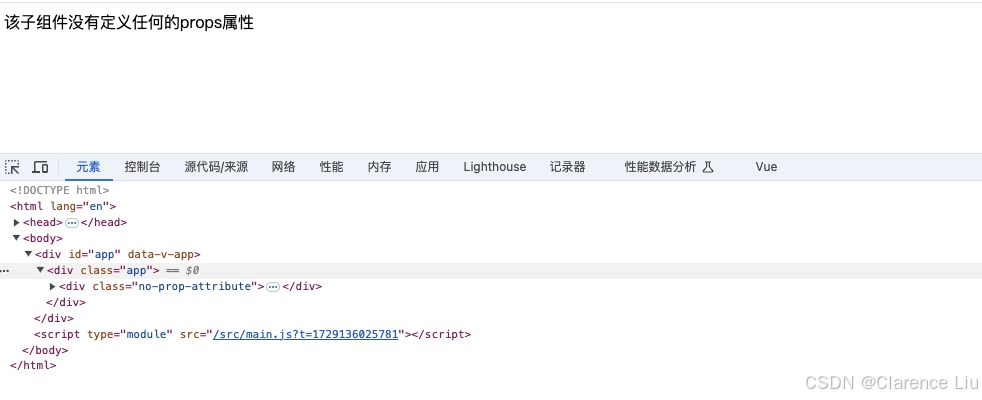
- 那么我们有时候有这样的场景,我们不希望组件的根元素继承属性。那么该如何禁用非
Props的属性继承呢?在组件中设置inheritAttr: false即可。可以通过$attrs访问所有的非Props的属性,并应用于根元素之外的其他元素。如下所示
<script>
export default {inheritAttrs: false,
}
</script><template><div class="no-prop-attribute">该子组件没有定义任何的props属性</div>
</template><style scoped></style>
- 如果想获取非
Props的属性,需要使用$attr获取,如下
<script>
export default {inheritAttrs: false,
}
</script><template><div class="no-prop-attribute" :id="$attrs.id">该子组件没有定义任何的props属性</div>
</template><style scoped></style>
子组件传递数据给父组件
- 子组件传递数据给父组件的需求也是非常普遍的,例如,子组件发生点击事件,需要传递一些索引等信息给父组件,父组件再进行刷新数据等操作, 下面是一个例子
<script>
import CounterOperation from "@/chapters/chapter06/CounterOperation.vue";
export default {components: {CounterOperation},data() {return {counter: 0}},methods: {addOne() {this.counter++},subOne() {this.counter--}}
}
</script><template><div><h4>当前计数: {{counter}}</h4><counter-operation @add="addOne" @sub="subOne"></counter-operation></div>
</template><style scoped></style>
<script>
export default {emits: ["add", "sub"],methods: {increment() {this.$emit("add")},decrement() {this.$emit("sub")}}
}
</script><template><div><button @click="increment">+1</button><button @click="decrement">-1</button></div>
</template><style scoped></style>
- 在子组件中定义触发事件的名称
emits: ["add", "sub"],父组件中以v-on的形式传入要监听的事件名称,并绑定到对应的方法中,例如@add="addOne",然后子组件中发生事件的时候,根据事件名称,使用$emit函数触发对应的事件,例如this.$emit("add")
