
网站建设全攻略站长之家ping检测
在使用容器时,避免不了会使用到私有仓库,一般都是采用 harbor 作为私有仓库,docker 对接 harbor 仓库非常简单,哪 containerd 如何对接 harbor 呢?
在内网使用 harbor 根据个人习惯,一般都是非 http 并且是通过IP 直接访问,如下:
 harbor仓库地址为:http://192.168.199.102:80 ,
containerd 如何上传或者下载镜像呢?
2.配置说明
2.1 生成配置文件
>mkdir -p /etc/containerd/ >containerd config default
> /etc/containerd/config.toml
2.2 修改配置
大概从144行开始 >vim +144 /etc/containerd/config.toml 144 [plugins."io.containerd.grpc.v1.cri".registry] 145 config_path = "/etc/containerd/certs.d" #修改该行的配置信息 ...
创建该目录
上面的目录+harbor仓库地址
>mkdir -p /etc/containerd/certs.d/192.168.199.102:80
编写 harbor 配置
>vim /etc/containerd/certs.d/192.168.199.102\:80/hosts.toml
server = "http://192.168.199.102:80"
[host."http://192.168.199.102:80"]capabilities = ["pull", "resolve", "push"]skip_verify = true
重启服务
>systemctl restart containerd
3.验证上传下载
3.1 准备镜像
首先,从网络上下载一个镜像
>nerdctl pull nginx:alpine
>nerdctl images
REPOSITORY    TAG       IMAGE ID        CREATED          PLATFORM       SIZE        BLOB SIZE
nginx         alpine    c94a22b036af    2 seconds ago    linux/amd64    42.7 MiB    16.0 MiB
为该镜像打TAG
>nerdctl tag nginx:alpine 192.168.199.102:80/library/nginx:alpine
>nerdctl images
REPOSITORY                          TAG       IMAGE ID        CREATED          PLATFORM       SIZE        BLOB SIZE
192.168.199.102:80/library/nginx    alpine    c94a22b036af    6 minutes ago    linux/amd64    42.7 MiB    16.0 MiB
nginx                               alpine    c94a22b036af    7 minutes ago    linux/amd64    42.7 MiB    16.0 MiB
3.2 登录harbor
>nerdctl login 192.168.199.102:80
Enter Username: admin
Enter Password:
WARNING: Your password will be stored unencrypted in /root/.docker/config.json.
Configure a credential helper to remove this warning. See
https://docs.docker.com/engine/reference/commandline/login/#credentials-storeLogin Succeeded
3.3 上传镜像
上传到 harbor 仓库
>nerdctl push 192.168.199.102:80/library/nginx:alpine
INFO[0000] pushing as a reduced-platform image (application/vnd.docker.distribution.manifest.list.v2+json, sha256:3d7805c209c8f28a172fc1b6adea4db8d68ca54d0e1696a655ef0c75333add45)
index-sha256:3d7805c209c8f28a172fc1b6adea4db8d68ca54d0e1696a655ef0c75333add45:    done           |++++++++++++++++++++++++++++++++++++++|
manifest-sha256:01ccf4035840dd6c25042b2b5f6b09dd265b4ed5aa7b93ccc4714027c0ce5685: done           |++++++++++++++++++++++++++++++++++++++|
config-sha256:8e75cbc5b25c8438fcfe2e7c12c98409d5f161cbb668d6c444e02796691ada70:   done           |++++++++++++++++++++++++++++++++++++++|
elapsed: 0.9 s                                                                    total:  18.0 K (20.0 KiB/s)
3.4 harbor仓库查看镜像
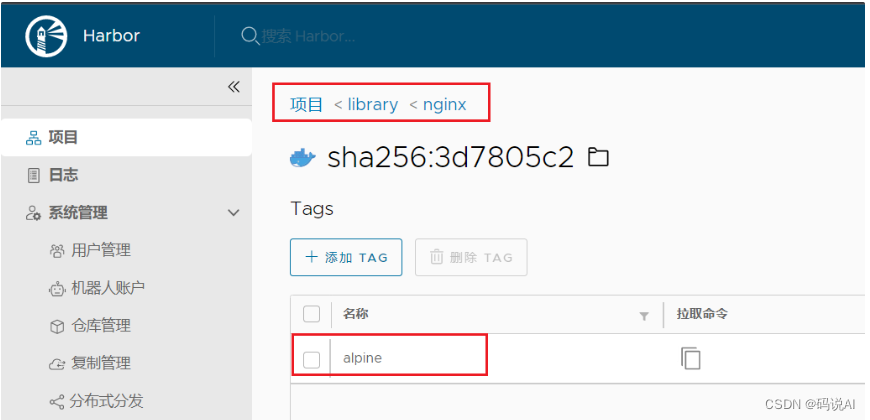
3.5 删除本地镜像
>nerdctl rmi 192.168.199.102:80/library/nginx:alpine nginx:alpine
>nerdctl images
REPOSITORY    TAG    IMAGE ID    CREATED    PLATFORM    SIZE    BLOB SIZE
3.6 启动容器
目前本地是没有镜像的,直接通过 nerdctl run 启动容器。当本地没有镜像时,会直接从 harbor 拉取镜像。
>nerdctl  images
REPOSITORY    TAG    IMAGE ID    CREATED    PLATFORM    SIZE    BLOB SIZE
>nerdctl run --name ngx -d -p 80:80 192.168.199.102:80/library/nginx:alpine
192.168.199.102:80/library/nginx:alpine:                                          resolved       |++++++++++++++++++++++++++++++++++++++|
index-sha256:3d7805c209c8f28a172fc1b6adea4db8d68ca54d0e1696a655ef0c75333add45:    done           |++++++++++++++++++++++++++++++++++++++|
manifest-sha256:01ccf4035840dd6c25042b2b5f6b09dd265b4ed5aa7b93ccc4714027c0ce5685: done           |++++++++++++++++++++++++++++++++++++++|
config-sha256:8e75cbc5b25c8438fcfe2e7c12c98409d5f161cbb668d6c444e02796691ada70:   done           |++++++++++++++++++++++++++++++++++++++|
layer-sha256:c23b4f8cf279507bb1dd3d6eb2d15ca84fac9eac215ab5b529aa8b5a060294c8:    done           |++++++++++++++++++++++++++++++++++++++|
layer-sha256:f56be85fc22e46face30e2c3de3f7fe7c15f8fd7c4e5add29d7f64b87abdaa09:    done           |++++++++++++++++++++++++++++++++++++++|
layer-sha256:2ce963c369bc5690378d31c51dc575c7035f6adfcc1e286051b5a5d9a7b0cc5c:    done           |++++++++++++++++++++++++++++++++++++++|
layer-sha256:59b9d2200e632e457f800814693b3a01adf09a244c38ebe8d3beef5c476c4c55:    done           |++++++++++++++++++++++++++++++++++++++|
layer-sha256:3e1e579c95fece6bbe0cb9c8c2949512a3f8caaf9dbe6219dc6495abb9902040:    done           |++++++++++++++++++++++++++++++++++++++|
layer-sha256:547a97583f72a32903ca1357d48fa302e91e8f83ffa18e0c40fd87adb5c06025:    done           |++++++++++++++++++++++++++++++++++++++|
layer-sha256:1f21f983520d9a440d410ea62eb0bda61a2b50dd79878071181b56b82efa9ef3:    done           |++++++++++++++++++++++++++++++++++++++|
elapsed: 2.1 s                                                                    total:  16.0 M (7.6 MiB/s)
bfd2c9c9078966b6709f457586da83e604eb6c05055cc6a04febe8659d47bfb1>nerdctl images
REPOSITORY                          TAG       IMAGE ID        CREATED           PLATFORM       SIZE        BLOB SIZE
192.168.199.102:80/library/nginx    alpine    3d7805c209c8    28 seconds ago    linux/amd64    42.7 MiB    16.0 MiB
>nerdctl  ps -a
CONTAINER ID    IMAGE                                      COMMAND                   CREATED           STATUS    PORTS                 NAMES
bfd2c9c90789    192.168.199.102:80/library/nginx:alpine    "/docker-entrypoint.…"    29 seconds ago    Up        0.0.0.0:80->80/tcp    ngx
3.7 验证查看
>curl -I localhost
HTTP/1.1 200 OK
Server: nginx/1.23.4
Date: Thu, 06 Apr 2023 06:41:25 GMT
Content-Type: text/html
Content-Length: 615
Last-Modified: Tue, 28 Mar 2023 17:09:24 GMT
Connection: keep-alive
ETag: "64231f44-267"
Accept-Ranges: bytes
OK,nginx启动成功。
4.配置镜像加速
通过上面的配置,不难启发我们配置国内镜像加速的方式,例如为 docker.io 配置镜像加速
>mkdir -p /etc/containerd/docker.io
>vim /etc/containerd/docker.io/hosts.toml
server = "https://docker.io"
[host."https://xxx.mirror.aliyuncs.com"]  #注册阿里云可查看个人加速源
重启服务
>systemctl restart containerd测试拉取镜像
>nerdctl pull mysql
>nerdctl  images
REPOSITORY    TAG                 IMAGE ID        CREATED           PLATFORM       SIZE         BLOB SIZE
busybox       stable              5acba83a746c    17 minutes ago    linux/amd64    1.2 MiB      758.9 KiB
java          8u111-jdk-alpine    d49bf8c44670    15 minutes ago    linux/amd64    140.3 MiB    49.3 MiB
mysql         latest              e9027fe4d91c    2 seconds ago     linux/amd64    504.6 MiB    144.4 MiB
nginx         alpine              eb05700fe7ba    23 minutes ago    linux/amd64    25.2 MiB     9.7 MiB
参考:
https://www.cnblogs.com/hukey/p/17293126.html
docker中安装最新版私有镜像仓库harbor(v2.8.2 ) - 知乎
https://www.cnblogs.com/birkhoffxia/articles/17547907.html
harbor安装_凤凰涅槃的技术博客_51CTO博客
https://www.cnblogs.com/qfdxxdr/p/16384133.html